
Certification Exam Instructions
Read through these instructions carefully to avoid delays on the day of your exam.
PREPARATIONS PRIOR TO THE DAY OF YOUR EXAM
A few days BEFORE you plan to take the exam, please click the button below to watch the short tutorial video.
This video will help you understand the testing space and technology preparations you will need to make prior to beginning your exam and connecting with an online proctor. Reviewing and complying with these requirements a few days prior to taking your exam will prevent unnecessary delays during the exam check-in process.
Confirm you meet the following technology and location requirements:
- Desktop / laptop computer WITH a webcam
- Reliable internet connection
- Smartphone or tablet with a camera and internet access
- Google Meets App downloaded on your smartphone or tablet
- Government-Issued Photo ID
- A private location where other individuals will not be in the same room as the examinee.
EXAM FORMAT AND ALLOWED MATERIALS
- The exam is a closed-book exam. You may NOT bring into the exam space any construction or remodeling reference books, the certification study guide, or any personal notebooks.
- You may bring a blank piece of scratch paper and a pen or pencil.
- Simple, hand-held calculators may be used. You will not be able to use the calculator app on your computer or phone.
- Laptop computers and other electronic devices may not be used for any purpose other than taking your exam and allowing the proctor to observe you.
- The exam is one section. You will have 4 hours to complete this exam. You cannot stop the timer during the exam.
•You may take a short bathroom break during the exam. Please inform your proctor prior to doing so. The exam timer will continue to run during any breaks. - The exam is multiple choice. You must select only one of the four answer options for each question.
- You may mark and return to review previous questions prior to submitting your completed exam. To mark a question for review, use the "Review" button at the bottom of your exam window. You will be able to easily identify and return to questions you marked for review, as their question number will be highlighted at the top of your exam window during the exam. Simply click on the highlighted question number to return to the exam question you marked for review.
- Exam scoring is done on the basis of the percentage of correct answers compared to the total number of questions. Any unanswered questions will be scored as incorrect.
- In most cases, exam results will be sent to each candidate within 30 days of the end of the exam period. NARI reserves the right to extend the decision period to ensure proper review by and input from all members of the Certification Board.
ON THE DAY OF YOUR EXAM
- Click on the exam link provided by NARI in your examination information e-mail.
- You will be redirected to our exam provider’s website. Click CONNECT TO PROCTOR button.
- Review all testing policies and click on the corresponding check boxes to agree to the outlined rules and advance through the examination check-in process.
- Enter your Name, Email Address, and Phone Number into the form fields.
- ID Verification – As an exam security measure, you will need to take a photo of your government-issued photo ID, along with a clear photo of your face. This is done through your laptop or desktop camera.
- When examinee verification has been completed, click CONNECT TO PROCTOR button.
- Review your information to ensure it is correct and click OPEN CHAT button to begin your session with an exam proctor.
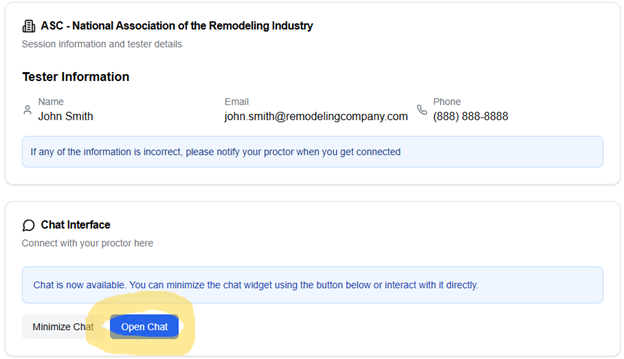
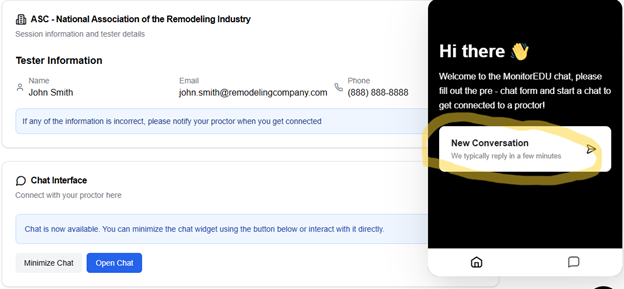
- Click NEW CONVERSATION in the popup on the right. This will place you in the queue. A proctor will join the chat shortly to help you connect on video and assist you in starting your exam.
GOOD LUCK ON YOUR EXAM!